Your AV receiver is the heart of your home theater, processing intricate audio and video signals to deliver an immersive entertainment experience. But with great power comes significant heat, a silent enemy that can degrade performance, shorten lifespan, and even lead to premature component failure. If you’ve noticed your receiver getting unusually warm, or if it’s enclosed in a cabinet with limited airflow, it’s time to consider a cooling solution. Fortunately, you don’t need to spend a fortune on commercial cooling systems; building your own DIY cooling fan can be a cost-effective and highly effective way to keep your valuable equipment running optimally. This guide will walk you through the process, from selecting the right components to a step-by-step construction, ensuring your AV receiver stays cool and performs flawlessly for years to come.
Why Your AV Receiver Needs Cooling
Modern AV receivers are packed with powerful amplifiers, processors, and numerous input/output components, all of which generate heat during operation. When this heat isn’t effectively dissipated, it accumulates inside the receiver’s chassis. Excessive heat can lead to a range of problems, including reduced performance, system instability, and ultimately, a shortened lifespan for internal components like capacitors and integrated circuits. Over time, consistent overheating can cause permanent damage, leading to costly repairs or the need for a full replacement.
Proper cooling helps maintain the receiver’s internal temperature within its optimal operating range. This not only protects the delicate electronics from thermal stress but also ensures stable performance, especially during demanding tasks like driving multiple speakers at high volumes or processing complex video signals. A well-cooled receiver can provide clearer sound, more reliable operation, and a longer life, safeguarding your investment in your home theater system.
Types of DIY Cooling Solutions
When it comes to cooling your AV receiver, DIY approaches offer flexibility and customization. The most common and accessible methods involve external fan setups, designed to enhance airflow around and through the receiver’s ventilation system.
One popular option is a top-mounted external fan assembly. This typically involves creating a custom enclosure or platform that sits directly above the receiver’s top vents. Fans are then integrated into this platform, drawing hot air upwards and away from the unit. Materials like foam board or thin plywood are often used for the enclosure, allowing for a precise fit over the receiver’s existing ventilation grilles. This method is effective because hot air naturally rises, and these fans assist in exhausting that heat efficiently.
A simpler alternative is directly placing USB fans on top of the receiver. This can be as straightforward as positioning one or more PC-style USB fans over the hottest sections of the receiver, ensuring they are configured to exhaust air. While less aesthetically refined than a custom enclosure, this method is quick to implement and often very effective, particularly if using larger, quieter fans. More advanced, and significantly riskier, methods involve opening the receiver and installing fans internally or adding heatsinks to specific components. However, these internal modifications should generally be avoided unless you possess advanced electronics knowledge, as they can void warranties and potentially damage your receiver.
Essential Components for Your DIY Cooling Fan
Building an effective DIY cooling solution for your AV receiver requires a few key components. Choosing the right parts will ensure optimal performance, quiet operation, and a setup that integrates seamlessly with your existing system.
Fans
The fans are the core of your cooling system. PC-style fans are commonly used due to their availability, affordability, and range of sizes.
- Size: Larger fans (e.g., 120mm) are generally preferred over smaller ones (e.g., 40mm or 80mm). Larger fans can move more air at lower RPMs, resulting in significantly quieter operation. Smaller fans often need to spin much faster to achieve comparable airflow, leading to more noise.
- Voltage: Most DIY setups utilize 5V USB-powered fans. These are convenient as they can often be powered directly from your receiver’s USB port or a standard USB wall adapter.
- Airflow Direction: Crucially, fans should be configured to exhaust hot air out of the receiver, not blow cool air in. Hot air naturally rises, so fans placed on top of the receiver should be oriented to pull air upwards and away from the unit.
|
Our Picks for the Best AV Receiver in 2026
As an Amazon Associate I earn from qualifying purchases.
|
||
| Num | Product | Action |
|---|---|---|
| 1 | Sony STRDH590 5.2 Channel Surround Sound Home Theater Receiver: 4K HDR AV Receiver with Bluetooth,Black |

|
| 2 | Sony STRDH190 2-ch Home Stereo Receiver with Phono Inputs & Bluetooth Black |
|
| 3 | Sony STR-AN1000 7.2 CH Surround Sound Home Theater 8K A/V Receiver: Dolby Atmos, DTS:X, Digital Cinema Auto Calibration IX, Bluetooth, WiFi, Google Chromecast, Spotify connect, Apple AirPlay, HDMI 2.1 |
|
| 4 | Onkyo TX-RZ30 9.2-Channel AV Receiver - 100 Watts Per Channel, Dirac Live Out of Box, Works with Sonos Certified, THX Certified and More |
|
| 5 | Sony STRDH590 5.2 Multi-Channel 4k HDR AV Receiver with Bluetooth (Renewed) Bundle with 3 YR CPS Enhanced Protection Pack |
|
| 6 | YAMAHA RX-V385 5.1-Channel 4K Ultra HD AV Receiver with Bluetooth |
|
| 7 | Pyle 5.2 Channel Hi-Fi Home Theater Receiver - 1000W MAX Wireless BT Surround Sound Stereo Amplifier System with 4k Ultra HD Support, MP3/USB/DAC, Ideal for Immersive Home Audio Experience |
|
| 8 | Denon AVR-X1800H 7.2 Channel AV Stereo Receiver - 80W/Channel, Wireless Streaming via Built-in HEOS, WiFi, & Bluetooth, Supports Dolby Vision, HDR10+, Dynamic HDR, & Home Automation Systems |
|
| 9 | Denon AVR-X1700H 7.2 Channel AV Receiver - 80W/Channel, Advanced 8K HDMI Video w/eARC, Dolby Atmos, DTS:X, Built-in HEOS, Amazon Alexa Voice Control |
|
| 10 | Denon AVR-S570BT AV Receiver 5.2 Channel 8K Ultra HD Audio & Video, Stereo Receivers, Denon AVR Wireless Streaming Bluetooth, (4) 8K HDMI Inputs, eARC, HD Setup Assistant |
|
Power Source
How you power your fans impacts convenience and integration.
- Receiver’s USB Port: If your AV receiver has a spare USB port, this is often the easiest and most integrated power source. The fans will typically turn on and off automatically with your receiver, streamlining operation. Ensure the port provides enough current for your chosen fans.
- External USB Wall Adapter: A standard 5V USB wall adapter (like those used for charging smartphones) provides a reliable power source. This offers flexibility in placement but means the fans operate independently of your receiver’s power state, requiring manual switching or a smart plug.
- Buck-Boost Module (Optional): For advanced users, a buck-boost module allows you to regulate the voltage supplied to your fans, giving you precise control over their speed. This involves some basic soldering skills and a multimeter to set the output voltage from a USB input.
Enclosure/Mounting Materials
While you can simply rest fans on top of your receiver, a custom enclosure offers better performance, stability, and aesthetics.
- Foam Board or Thin Plywood: These materials are easy to cut and shape, making them ideal for constructing a custom platform that fits perfectly over your receiver’s vents. Ensure the material is thick enough (e.g., 1/4 inch foam board) to provide adequate clearance between the fans and the receiver’s chassis, which is essential for optimal air suction.
- Basic Tools: You’ll need a utility knife or saw for cutting, a ruler, and a marker.
- Protective Grilles: To prevent cables from getting tangled in fan blades and to protect against accidental contact, protective grilles are highly recommended for any exposed fans.
- Adhesives/Fasteners: Hot glue, super glue, or small screws can be used to secure fans within the enclosure and to assemble the structure itself.
Step-by-Step Guide: Building Your DIY AV Receiver Cooling Fan
Building a DIY cooling fan for your AV receiver is a rewarding project that can significantly extend the life and improve the performance of your system. Follow these steps to create an effective and quiet cooling solution.
Planning and Measurement
Before you begin cutting or wiring, carefully plan your fan setup. First, identify the primary ventilation areas on the top of your AV receiver. These are typically grilles or openings where heat naturally escapes. Use a ruler to measure the dimensions of these areas, as well as the overall top surface of your receiver. This will help you determine the size of your cooling platform and the optimal placement for your fans.
Consider the number and size of fans you want to use. For example, two 120mm fans often provide excellent airflow with minimal noise. Ensure that your chosen fans will fit comfortably within the dimensions you’ve measured, allowing for a small border around them for structural integrity if you’re building an enclosure.
Constructing the Enclosure (Optional but Recommended)
Creating a custom enclosure or platform provides a stable, aesthetically pleasing, and more effective cooling solution.
- Cut the Base: Using foam board, thin plywood, or acrylic, cut a rectangular piece that is slightly larger than the top surface of your receiver or just large enough to cover the main ventilation area.
- Cut Fan Openings: Mark the positions for your fans on the base. Using a utility knife (for foam board/acrylic) or a jigsaw (for wood), carefully cut out square or circular openings for each fan. Ensure the openings are slightly smaller than the fan frames so the fans can be mounted securely from below or above.
- Add Clearance (Important): To ensure optimal airflow, the fans need some clearance from the receiver’s surface. Cut strips of your chosen material to create “risers” around the perimeter of your base. Aim for at least 1 inch (2.5 cm) of clearance between the bottom of the fan blades and the receiver’s top surface. Glue these risers to the underside of your base.
- Assemble: Securely attach the fans to their respective openings, typically from the underside of the platform, ensuring the airflow direction is set to exhaust air upwards. Use hot glue, super glue, or small screws if your material allows. You can also add a top panel or frame for a more finished look, ensuring it doesn’t obstruct airflow.
Wiring the Fans
Connecting your fans to a power source is a critical step.
- USB Fan (Direct Connect): If you are using pre-made USB fans, simply plug them into your receiver’s USB port or a USB wall adapter. This is the simplest option.
- Standard PC Fans with USB Cable: If you’re using standard 5V PC fans that don’t come with a USB connector:
- Prepare USB Cable: Cut an old USB cable, exposing the red (+5V) and black (ground) wires. You might need a multimeter to confirm which wire is which if the colors aren’t standard.
- Connect Fan Wires: Twist or solder the fan’s positive wire (usually red or yellow) to the USB cable’s red wire, and the fan’s negative wire (usually black) to the USB cable’s black wire.
- Insulate: Use heat shrink tubing or electrical tape to insulate each connection separately, then insulate the entire joint to prevent short circuits.
- Using a Buck-Boost Module (for Variable Speed):
- Connect USB Input: Solder the cut USB cable’s red and black wires to the input terminals of the buck-boost module (usually marked IN+ and IN-).
- Connect Fan Output: Solder the fan’s positive and negative wires to the output terminals of the buck-boost module (usually OUT+ and OUT-).
- Adjust Voltage: Plug in the USB cable (connected to the module), then use a small screwdriver to adjust the potentiometer on the buck-boost module. Use a multimeter to measure the output voltage and set it to your desired level (e.g., 3V-5V for typical 5V fans, lower voltage means slower speed and less noise).
Assembly and Placement
Once the wiring is complete and the enclosure is built, it’s time for final assembly and placement.
- Secure Fans: Double-check that all fans are securely mounted and that protective grilles are in place if used.
- Position: Place your assembled cooling unit directly on top of your AV receiver, aligning the fans with the receiver’s ventilation grilles.
- Airflow Check: Power on your receiver and cooling fan. Gently feel above the fans to confirm that they are pulling hot air out of the receiver. If you feel air being pushed down, reverse the fan’s orientation.
- Vibration Reduction: If you notice any vibration, consider adding small rubber feet or pads between the cooling unit and your receiver to dampen noise.
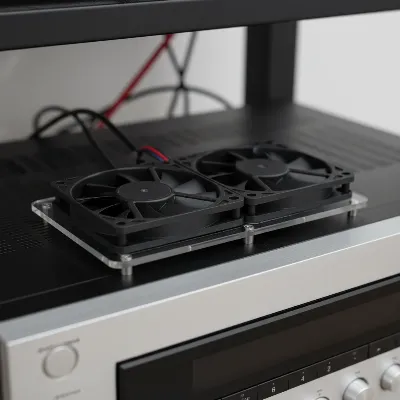 A DIY AV receiver cooling fan setup with two fans on a custom platform.
Optimizing Your Cooling Setup
Once your DIY cooling fan is built, a few optimizations can further enhance its effectiveness and user experience. Paying attention to these details can make a significant difference in both performance and longevity.
Fan size versus noise is a crucial consideration. As discussed, larger fans (e.g., 120mm) operating at lower RPMs tend to be much quieter than smaller fans spinning rapidly. If fan noise is an issue, consider upgrading to larger fans or incorporating a speed controller (like a buck-boost module) to reduce RPMs. Even a slight reduction in speed can dramatically lower audible noise without compromising too much on cooling performance, especially if your receiver isn’t severely overheating.
Proper airflow remains paramount. Always ensure your fans are configured to exhaust hot air from the receiver. Heat naturally rises, so fans on the top surface should draw air up and away. If your receiver is in an enclosed cabinet, consider adding additional fans to the cabinet itself to create a positive airflow system, drawing cooler air into the cabinet and expelling warm air. This comprehensive approach prevents heat from recirculating around the receiver.
Vibration reduction is also key for a quiet setup. Fans, especially when not perfectly balanced, can transmit vibrations to the receiver chassis, causing an annoying hum. Placing small rubber feet, felt pads, or soft silicone washers between the fans and your enclosure, or between the enclosure and the receiver, can effectively dampen these vibrations. This simple step can transform a noisy cooling solution into a nearly silent one. While precise temperature monitoring might require specialized equipment, you can roughly assess effectiveness by feeling the receiver’s surface before and after implementing the cooling. A noticeable reduction in surface temperature usually indicates success.
Troubleshooting Common Issues
Even with careful planning, you might encounter minor issues with your DIY cooling fan. Here’s how to address some common problems:
Fan Noise
If your cooling setup is louder than expected, several factors could be at play. First, check the fan size; smaller fans inherently generate more noise as they spin faster. Consider replacing them with larger fans (120mm or larger) that can move the same amount of air at lower RPMs. Second, investigate vibration. Ensure fans are securely mounted and not rattling against the enclosure or the receiver. Adding rubber grommets, silicone pads, or felt feet can help absorb vibrations. Lastly, if you have a variable speed controller (like a buck-boost module), try lowering the fan speed. Even a slight reduction can significantly decrease noise without severely impacting cooling performance.
Ineffective Cooling
If your receiver still feels hot despite the fans, re-evaluate your setup. The most common culprit is incorrect airflow direction; ensure the fans are exhausting hot air upwards and away from the receiver, not pushing air down into it. Check that there’s adequate clearance (at least 1 inch) between the fan blades and the receiver’s vents for proper suction. If your receiver is in a cabinet, the cabinet itself might be trapping heat. In this case, you might need to add exhaust fans to the cabinet to improve overall air circulation. Finally, verify that the fans are actually spinning at an appropriate speed; if they are too slow, they won’t move enough air.
Power Issues
If your fans aren’t turning on or are inconsistent, check the power connections. If using your receiver’s USB port, ensure the port is active and supplying power. Some receiver USB ports might only be active when specific functions are engaged. If using a wall adapter, try a different adapter or outlet to rule out a faulty power source. If you built a custom wiring solution, double-check all connections, especially if soldering was involved. A loose or incorrect wire connection (e.g., reversed polarity) can prevent fans from working. For buck-boost modules, ensure the input voltage is correct and the output voltage has been properly adjusted and confirmed with a multimeter.
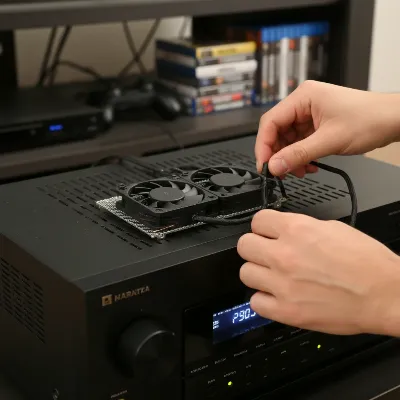 A person troubleshooting a DIY AV receiver cooling fan setup in a low-light home theater environment.
Conclusion
Building a DIY cooling fan for your AV receiver is a practical and highly beneficial project that protects your investment and enhances your home theater experience. By understanding the basics of heat dissipation, selecting appropriate components, and following a few straightforward steps, you can create a customized cooling solution that keeps your receiver operating at its best. From prolonging component life to ensuring consistent, high-quality audio and video performance, the benefits of a well-cooled AV receiver are undeniable. Don’t let overheating compromise your entertainment; empower yourself with a simple DIY solution. What improvements have you seen in your AV receiver’s performance after implementing a cooling solution?
Frequently Asked Questions
How hot is too hot for an AV receiver?
While exact temperatures vary by manufacturer and model, most AV receivers are designed to operate optimally within a certain range. If the top of your receiver is too hot to comfortably touch for more than a few seconds, or if you notice intermittent audio/video drops or the receiver shutting down, it’s likely running too hot. Many modern receivers will enter a “protection mode” if internal temperatures become critical, shutting down to prevent damage.
Can I just put a regular fan next to my receiver?
While placing a regular fan nearby can help increase general airflow in the area, it’s often less effective than a dedicated cooling fan placed directly on or over the receiver’s vents. A DIY solution focuses airflow precisely where it’s needed most, actively pulling or pushing air through the receiver’s internal components, which is more efficient for heat extraction.
Are pre-built cooling solutions better?
Pre-built AV Receiver cooling solutions, such as those from brands like AC Infinity, are often well-engineered, quiet, and offer features like temperature-controlled operation and sleek designs. They can be an excellent “plug-and-play” option if budget isn’t a concern. However, DIY solutions offer significant cost savings, customization to your specific receiver’s dimensions, and the satisfaction of building something yourself, often achieving comparable cooling performance.