An AV receiver overheating can lead to performance issues, premature failure, or safety hazards, but most problems are preventable with simple DIY fixes. The most frequent causes include inadequate ventilation, dust buildup, speaker-related issues like impedance mismatch or frayed wires, excessive volume, and high ambient room temperatures. Addressing these issues quickly can significantly extend the receiver’s lifespan and maintain optimal audio quality.
Why Your AV Receiver Gets Hot: Understanding the Causes
AV receivers are powerhouses, especially their amplifier sections, which work tirelessly to deliver robust sound to your speakers. This constant power delivery and internal processing inherently generate heat. While some warmth is normal, persistent or extreme heat indicates a problem. Often, the issue isn’t a faulty receiver but rather a consequence of its operating environment or how it’s being used.
Common reasons for an AV receiver to overheat include:
- Inadequate Ventilation: This is perhaps the most frequent cause. Receivers require ample space around them for heat to dissipate naturally through their top and side vents. Enclosed cabinets, tight shelves, or stacking other components on top can trap hot air, preventing effective cooling.
- Dust Buildup: Over time, dust accumulates within the receiver and on its heatsinks and vents. This dust acts as an insulating layer, severely impeding airflow and trapping heat inside the unit.
- Speaker-Related Issues:
- Impedance Mismatch: Using speakers with a lower impedance than your receiver is designed to handle forces the amplifier to work harder, drawing more current and generating excessive heat.
- Frayed Speaker Wires or Shorts: Loose strands of speaker wire touching each other or the receiver’s chassis can create a short circuit. This causes the amplifier to draw excessive current, leading to rapid heat buildup and often triggering the receiver’s protection mode.
- Excessive Volume or Amplifier Strain: Consistently pushing your receiver to very high volumes, or running speakers full-range without a dedicated subwoofer to handle bass frequencies, places a heavy load on the internal amplifiers, making them run hotter.
- Environmental Factors: A high ambient room temperature can also contribute to the receiver’s internal temperature rising above safe operating limits.
Signs Your AV Receiver is Overheating (And Why It Matters)
Recognizing the signs of an overheating AV receiver early is crucial to prevent serious damage. Ignoring these warnings can lead to costly repairs or even the need for a complete replacement.
The most common indicators that your AV receiver is getting too hot include:
- Sudden Shutdowns (Protection Mode): Modern AV receivers are equipped with thermal protection circuits designed to shut down the unit automatically if internal temperatures become dangerously high. This is a safety feature, but frequent shutdowns indicate a persistent overheating problem.
- Excessive Heat to the Touch: While receivers normally feel warm, if the casing is unusually hot, especially on the top or sides, it’s a clear sign of overheating. It should never be so hot that it’s uncomfortable to touch.
- Distorted or Muddled Audio: When an amplifier struggles with heat, its performance degrades. You might notice the sound becoming less clear, distorted, or losing detail, particularly at higher volumes. Bass might sound less punchy, and higher frequencies more jarring.
- Flashing LED Indicators: Some receivers display specific error codes or flashing LEDs when they enter protection mode due to overheating or other issues. Consult your receiver’s manual for specific meanings.
- Burning Smell or Smoke: In severe and prolonged cases, extreme overheating can lead to internal components charring or melting, producing a burning smell or even visible smoke. If you detect this, immediately power off and unplug the receiver.
Addressing overheating promptly helps ensure improved longevity for your valuable equipment, prevents potential accidents like electrical fires, and protects other connected components from damage.
Five Quick DIY Fixes for an Overheating AV Receiver
Don’t let an overheating AV receiver disrupt your home entertainment. Many common overheating issues can be resolved with simple DIY adjustments. Here are five quick fixes you can implement to get your system running cool again.
1. Optimize Ventilation and Placement
|
Our Picks for the Best AV Receiver in 2026
As an Amazon Associate I earn from qualifying purchases.
|
||
| Num | Product | Action |
|---|---|---|
| 1 | Sony STRDH590 5.2 Channel Surround Sound Home Theater Receiver: 4K HDR AV Receiver with Bluetooth,Black |

|
| 2 | Pyle 5.2 Channel Hi-Fi Home Theater Receiver - 1000W MAX Wireless BT Surround Sound Stereo Amplifier System with 4k Ultra HD Support, MP3/USB/DAC, Ideal for Immersive Home Audio Experience |
|
| 3 | Sony STR-AN1000 7.2 CH Surround Sound Home Theater 8K A/V Receiver: Dolby Atmos, DTS:X, Digital Cinema Auto Calibration IX, Bluetooth, WiFi, Google Chromecast, Spotify connect, Apple AirPlay, HDMI 2.1 |
|
| 4 | Denon AVR-X1800H 7.2 Channel AV Stereo Receiver - 80W/Channel, Wireless Streaming via Built-in HEOS, WiFi, & Bluetooth, Supports Dolby Vision, HDR10+, Dynamic HDR, & Home Automation Systems |
|
| 5 | Sony STRDH590 5.2 Multi-Channel 4k HDR AV Receiver with Bluetooth (Renewed) Bundle with 3 YR CPS Enhanced Protection Pack |
|
| 6 | Sony STRDH190 2-ch Home Stereo Receiver with Phono Inputs & Bluetooth Black |
|
| 7 | YAMAHA RX-V385 5.1-Channel 4K Ultra HD AV Receiver with Bluetooth |
|
| 8 | Onkyo TX-RZ30 9.2-Channel AV Receiver - 100 Watts Per Channel, Dirac Live Out of Box, Works with Sonos Certified, THX Certified and More |
|
| 9 | Denon AVR-X1700H 7.2 Channel AV Receiver - 80W/Channel, Advanced 8K HDMI Video w/eARC, Dolby Atmos, DTS:X, Built-in HEOS, Amazon Alexa Voice Control |
|
| 10 | Denon AVR-S570BT AV Receiver 5.2 Channel 8K Ultra HD Audio & Video, Stereo Receivers, Denon AVR Wireless Streaming Bluetooth, (4) 8K HDMI Inputs, eARC, HD Setup Assistant |
|
Poor airflow is the number one enemy of electronic components. Your AV receiver is designed with vents to allow hot air to escape, and blocking these vents traps heat.
- Provide Ample Space: Ensure there is at least 5 inches (12.5 cm) of clear space above your receiver and 2-3 inches (5-7.5 cm) on either side. This allows for natural convection, where hot air rises and cooler air circulates in.
- Avoid Enclosed Cabinets: If your receiver is tucked away in a closed cabinet, consider moving it to an open shelf or investing in AV furniture specifically designed with adequate ventilation, often featuring open backs or slotted shelves.
- No Stacking: Never stack other heat-producing components directly on top of your receiver. If stacking is unavoidable, ensure there is significant clearance or use isolation feet to create an air gap.
- Away from Heat Sources: Position your receiver away from direct sunlight, radiators, or other heat-generating appliances.
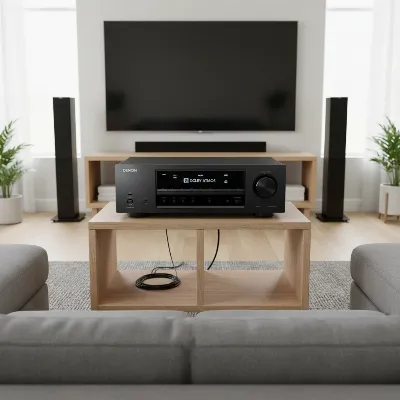 An AV receiver on an open shelf with plenty of space above and to the sides, showcasing ideal ventilation setup.
2. Clean Dust and Vents Regularly
Dust is an insidious foe for electronics. It acts as an insulator, coating internal components and blocking the critical vents needed for heat dissipation.
- External Cleaning: Use a soft, dry cloth to wipe down the exterior of your receiver and clear any dust from the external vents on the top and sides.
- Internal Cleaning (with caution): For a more thorough clean, carefully unplug your receiver and, if you are comfortable, remove the top cover (refer to your manual for instructions). Use a can of compressed air to gently blow dust out of the heatsinks, circuit boards, and internal fans (if present). Hold the can upright and use short bursts. Alternatively, a low-power vacuum cleaner with a brush attachment can be used, keeping the nozzle a few inches away from components to avoid static discharge.
- Frequency: Aim to clean your receiver’s vents and exterior every few months, and perform a more thorough internal cleaning (if comfortable) once a year or as needed.
3. Inspect Speaker Wiring and Impedance
Faulty speaker connections or an impedance mismatch can force your receiver’s amplifier to work harder than intended, leading to excessive heat.
- Check for Frayed Wires and Shorts: Disconnect all speaker wires from your receiver. Carefully inspect each wire for any frayed strands or exposed copper that could be touching another wire or the receiver’s metal chassis. Even a single stray strand can cause a short circuit.
- Secure Connections: Re-strip any damaged wires and ensure clean, tight connections. Consider using banana plugs for a more secure and reliable connection that prevents stray strands.
- Verify Impedance Matching: Check your speakers’ impedance (usually 4, 6, or 8 ohms) and compare it to your receiver’s specifications. Most receivers are designed for 6 or 8-ohm speakers. If you have lower-impedance speakers (e.g., 4 ohms), ensure your receiver is rated to handle them. Running 4-ohm speakers on an 8-ohm-only receiver can cause severe strain and overheating. Some receivers have a switch to adjust for different speaker impedances; ensure it’s set correctly.
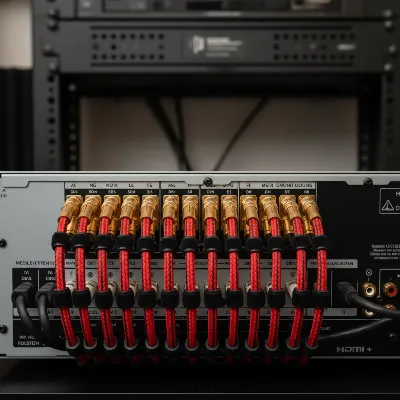 Close-up of speaker wire connections, highlighting proper, secure wiring without frayed strands for an AV receiver.
4. Adjust Volume and Speaker Crossovers
The harder your receiver’s amplifier works, the more heat it generates. Adjusting how your system handles sound can significantly reduce the load.
- Moderate Volume Levels: While it’s tempting to crank up the volume, prolonged listening at very high levels, especially beyond the “reference level” (typically around -10 dB to 0 dB on the volume scale), can push your amplifier to its limits and induce overheating. If your receiver feels excessively hot, try reducing the volume.
- Utilize Subwoofers and Crossovers: Bass frequencies require the most power from an amplifier. If you have a subwoofer, ensure it’s properly integrated and handling the lower frequencies. Set the crossover frequency in your receiver’s settings (typically between 80-120 Hz) so that frequencies below this point are sent to the subwoofer, offloading the main amplifier channels. This dramatically reduces the workload on your receiver, leading to less heat generation and cleaner sound.
5. Consider External Cooling Solutions
If optimizing placement and cleaning aren’t enough, or if your setup constraints limit natural ventilation, external cooling fans can be an excellent solution.
- Top-Mounted Exhaust Fans: These are particularly effective as hot air naturally rises. Fans like those from AC Infinity are designed to sit directly on top of your receiver, drawing hot air upwards and out. Many are temperature-controlled, kicking in only when needed, and operate quietly.
- Cabinet Ventilation Fans: If your receiver is in a cabinet, consider installing small fans at the rear or side vents of the cabinet to create positive or negative airflow, helping to circulate air and expel heat.
- USB-Powered Fans: Simple, inexpensive USB-powered fans can also be strategically placed behind or above your receiver to aid in airflow. While not as powerful as dedicated AV cooling units, they can make a noticeable difference.
These active cooling solutions provide an extra layer of protection, especially for high-powered systems or in warmer environments.
Preventing Future Overheating Issues
Beyond these immediate fixes, a proactive approach will keep your AV receiver cool and reliable for years to come. Consistency is key when it comes to maintaining your home theater’s performance.
- Routine Maintenance: Make vent cleaning a regular part of your home maintenance. A quick dust-off once a month can prevent major buildup.
- Mindful Placement: Always consider ventilation when rearranging your entertainment setup or adding new components. Prioritize open-air placement or adequately ventilated AV furniture.
- System Calibration: Periodically re-run your receiver’s automatic room calibration (e.g., Audyssey, MCACC, YPAO). This ensures that speaker levels, distances, and crossover frequencies are optimally set, preventing your amplifier from overworking due to incorrect settings.
- Power Down When Not in Use: If you’re not going to use your AV system for an extended period, turn off the receiver. This not only conserves energy but also gives the components a chance to cool down completely.
- Invest in Quality Cabling: While cheap cables might seem like a bargain, good quality, properly insulated speaker wire and interconnects can prevent issues like shorts and signal loss, which indirectly contribute to amplifier strain.
By integrating these practices into your routine, you create a healthier operating environment for your AV receiver, safeguarding your investment and ensuring you continue to enjoy pristine audio and video for the long haul.
Conclusion
An AV receiver is the heart of your home theater, and like any heart, it needs to be kept in optimal condition. Overheating is a common yet often preventable issue that can significantly degrade performance and shorten the lifespan of your valuable equipment. By understanding the underlying causes—from inadequate ventilation and dust buildup to improper speaker connections or excessive strain—you are empowered to take effective action. Implementing quick DIY fixes like optimizing placement, meticulous cleaning, inspecting speaker wiring, adjusting volume and crossovers, and considering external cooling can make a dramatic difference.
Prioritizing proper ventilation and routine maintenance ensures that your AV receiver operates within safe temperature limits, allowing you to fully immerse yourself in the rich, dynamic soundscapes and stunning visuals it’s designed to deliver. Don’t let a hot receiver cool your enthusiasm for home entertainment. Keep it cool, and keep the cinematic experience alive.
What are your go-to strategies for keeping your AV receiver from overheating?
Frequently Asked Questions
What is a normal operating temperature for an AV receiver?
It’s normal for AV receivers to feel warm to the touch during operation, especially in the amplifier section. However, they should not feel uncomfortably hot or scorching. While an exact “normal” temperature isn’t universally defined as it varies by model and usage, generally, if you can comfortably keep your hand on the unit, it’s likely within a safe range. Excessive heat that triggers protection mode or causes a burning smell indicates a problem.
Can overheating permanently damage an AV receiver?
Yes, prolonged or extreme overheating can cause permanent damage to an AV receiver. High temperatures stress internal components like capacitors and transistors, leading to reduced lifespan or complete failure. It can also melt solder joints, damage circuit boards, and in rare, severe cases, pose a fire hazard. The receiver’s protection mode is designed to prevent such damage by shutting down the unit before it reaches critical temperatures.
How often should I clean my AV receiver’s vents?
It is recommended to visually inspect and dust your AV receiver’s external vents at least once a month. A more thorough cleaning using compressed air to clear internal heatsinks and circuit boards (if you are comfortable opening the unit) should be performed every six to twelve months, depending on how dusty your environment is and how frequently the receiver is used. Regular cleaning is a simple yet vital step in preventing heat buildup.
Frequently Asked Questions
What is a normal operating temperature for an AV receiver?
It is normal for AV receivers to feel warm during operation, particularly in the amplifier section. However, the casing should not be uncomfortably hot or scorching to the touch. If you can comfortably keep your hand on the unit, it is likely within a safe operating range, but frequent shutdowns or a burning smell indicate a problem.
Can overheating permanently damage an AV receiver?
Yes, prolonged or extreme overheating can cause permanent damage to an AV receiver. High temperatures stress internal components like capacitors and transistors, leading to reduced lifespan or complete failure. The receiver's thermal protection circuit is designed to prevent such damage by shutting down the unit before critical temperatures are reached.
How often should I clean my AV receiver's vents?
You should visually inspect and dust your AV receiver's external vents at least once a month. A more thorough internal cleaning using compressed air to clear heatsinks and circuit boards should be performed every six to twelve months, depending on your environment's dust levels and usage frequency. Regular cleaning prevents heat buildup.
What are the main causes of an AV receiver getting too hot?
The main causes of an AV receiver getting too hot include inadequate ventilation, dust buildup inside the unit, speaker-related issues like impedance mismatch or frayed wires, consistently high volume levels, and high ambient room temperatures. Addressing these factors can significantly reduce heat generation.
How much space does an AV receiver need for proper ventilation?
For proper ventilation, an AV receiver requires at least 5 inches (12.5 cm) of clear space above the unit and 2-3 inches (5-7.5 cm) on either side. This allows for natural convection, where hot air rises and cooler air circulates, preventing heat from becoming trapped around the components.
Fix an Overheating AV Receiver
Resolve common AV receiver overheating issues with these five DIY steps to improve performance and extend lifespan.
Ensure your AV receiver has at least 5 inches of clear space above and 2-3 inches on the sides for proper airflow. Avoid placing it in enclosed cabinets or stacking other components on top, and keep it away from direct heat sources like sunlight or radiators.
Use a soft, dry cloth to wipe external vents monthly. For internal cleaning, unplug the receiver, carefully remove the top cover if comfortable, and use compressed air in short bursts to clear dust from heatsinks and circuit boards annually. This prevents dust from acting as an insulating layer.
Disconnect all speaker wires and check for frayed strands or shorts. Re-strip damaged wires and ensure secure connections, considering banana plugs. Verify your speakers' impedance (e.g., 4, 6, or 8 ohms) matches your receiver's specifications to prevent amplifier strain.
Avoid prolonged listening at very high volume levels, especially beyond -10 dB to 0 dB. If you have a subwoofer, set the crossover frequency in your receiver's settings (typically 80-120 Hz) to offload bass frequencies from the main amplifier channels, reducing its workload.
If natural ventilation is insufficient, use external cooling fans. Top-mounted exhaust fans, like those from AC Infinity, draw hot air upwards. Cabinet ventilation fans can create airflow in enclosed spaces, and simple USB-powered fans can also aid circulation.

The advice on checking speaker impedance was a game-changer for me. I had a mix of older speakers and newer ones, and I never really considered if they were compatible. While I didn’t have frayed wires, adjusting my speaker setup based on the impedance recommendations definitely helped reduce the heat coming from my Onkyo. It still gets a little warm, but nothing like before.
My Marantz receiver was getting alarmingly hot, and I was worried about it failing. I followed the suggestion to check for frayed speaker wires, and sure enough, one of my rear surrounds had a tiny strand touching the other terminal. Fixed it, and now the receiver runs much cooler. Simple fix that saved me a ton of money on a new unit!
Good info on dust buildup, but I wish there was more detail on specific cleaning tools. I tried using compressed air, but it felt like it just pushed some of the dust further in. My Yamaha receiver still runs a bit hot, especially when I crank up the volume. I’ll probably try a vacuum attachment next time.
I was having major issues with my Denon receiver shutting down during movies, and I thought it was toast. Turns out, it was just crammed into a cabinet with zero airflow. After reading about the ventilation tips, I rearranged my setup and added a small USB fan. It’s been running perfectly ever since, even during long gaming sessions. Huge relief!