Wiring home speakers to an AV receiver safely involves ensuring all components are powered off, using the correct wire gauge (e.g., 16-gauge for runs under 50 feet), matching speaker polarity, and securing connections with methods like banana plugs. This process prevents electrical hazards, optimizes sound quality, and ensures a reliable home theater setup.
Understanding Your AV Receiver and Speakers
Before diving into connections, it’s crucial to understand the basics of your equipment. An AV receiver acts as the central hub of your home theater, processing audio and video signals and powering your speakers. Each speaker, from front channels to surrounds and subwoofers, plays a specific role in creating an immersive soundscape. Proper wiring ensures that these components work harmoniously, delivering the audio experience they were designed for.
Essential Safety First
Safety should always be your top priority when working with electronics. Always ensure your AV receiver and all connected components are powered off and unplugged from the wall outlet before you begin any wiring. This prevents accidental short circuits, electrical shocks, and potential damage to your valuable equipment. Double-check that all power indicators are off before touching any wires or terminals.
Tools and Materials You’ll Need
Having the right tools and materials on hand will make the wiring process much smoother and safer. Here’s what you’ll typically require:
- Speaker Wire: The most critical component. Ensure you have enough length for all speakers, allowing some slack for adjustments.
- Wire Strippers/Cutters: Essential for safely removing insulation from speaker wire without damaging the copper strands.
- Optional Connectors:
- Banana Plugs: Highly recommended for secure, tidy connections and ease of use.
- Spade Connectors: Offer a firm connection under binding post nuts.
- Pin Connectors: Useful for spring clip terminals or side-entry binding posts.
- Small Screwdriver: For tightening binding post terminals or securing banana plugs.
- Tape or Cable Ties: For organizing and securing speaker wires.
- Flashlight: To illuminate dark areas behind your receiver and speakers.
Choosing the Right Speaker Wire Gauge
The thickness of your speaker wire, known as its gauge (AWG), significantly impacts performance, especially over longer distances. A lower AWG number indicates a thicker wire, which has less resistance and can carry a stronger signal.
- For most home theater systems and speaker runs under 50 feet (approximately 15 meters), 16-gauge speaker wire is typically sufficient.
- For longer runs (over 50 feet), or when using high-power amplifiers or lower-impedance speakers (4-6 ohms), upgrading to a thicker 14-gauge or even 12-gauge wire is advisable. This minimizes power loss and maintains signal integrity.
- Material matters: Opt for oxygen-free copper (OFC) wire, which offers superior signal transfer and is less prone to oxidation, ensuring better long-term performance.
- In-wall installation: If you plan to run wires inside your walls, use UL-rated wire (labeled CL2 or CL3) for safety and to reduce electromagnetic interference (EMI).
“Using the correct speaker wire gauge is fundamental to sound quality. Think of it as the highway for your audio signal – a wider, smoother road allows for a faster, clearer journey.”
Preparing Your Speaker Wires for Connection
Proper preparation of your speaker wires is key to a secure and effective connection.
- Measure and Cut: Determine the optimal length for each speaker wire, ensuring enough slack so wires aren’t strained, but not so much that you have excessive clutter. shorter runs generally mean better signal integrity.
- Strip the Insulation: Using wire strippers, carefully remove about ½ inch (1.25 cm) of insulation from both ends of each speaker wire. Be extremely cautious not to nick or cut any of the delicate copper strands, as damaged strands can degrade conductivity and performance.
- Twist the Strands: For bare wire connections, gently twist the exposed copper strands clockwise into a tight, neat point. This prevents stray strands from causing a short circuit by touching an opposite terminal.
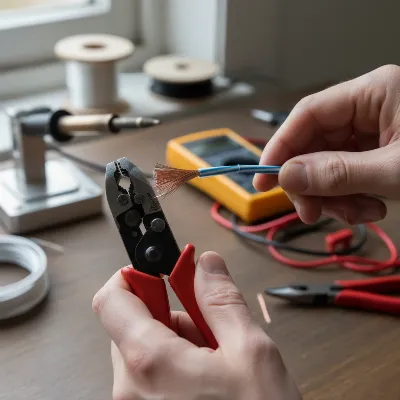 Person stripping and twisting speaker wire for AV receiver connection
Connecting Speakers to Your AV Receiver
The connection method depends on the type of terminals on your AV receiver and speakers. Most modern receivers feature either binding posts or spring clip terminals.
1. Bare Wire Connection (Spring Clip or Binding Post)
|
Our Picks for the Best AV Receiver in 2026
As an Amazon Associate I earn from qualifying purchases.
|
||
| Num | Product | Action |
|---|---|---|
| 1 | Onkyo TX-RZ30 9.2-Channel AV Receiver - 100 Watts Per Channel, Dirac Live Out of Box, Works with Sonos Certified, THX Certified and More |

|
| 2 | Sony STR-AN1000 7.2 CH Surround Sound Home Theater 8K A/V Receiver: Dolby Atmos, DTS:X, Digital Cinema Auto Calibration IX, Bluetooth, WiFi, Google Chromecast, Spotify connect, Apple AirPlay, HDMI 2.1 |
|
| 3 | YAMAHA RX-V385 5.1-Channel 4K Ultra HD AV Receiver with Bluetooth |
|
| 4 | Denon AVR-X1800H 7.2 Channel AV Stereo Receiver - 80W/Channel, Wireless Streaming via Built-in HEOS, WiFi, & Bluetooth, Supports Dolby Vision, HDR10+, Dynamic HDR, & Home Automation Systems |
|
| 5 | Sony STRDH590 5.2 Multi-Channel 4k HDR AV Receiver with Bluetooth (Renewed) Bundle with 3 YR CPS Enhanced Protection Pack |
|
| 6 | Sony STRDH590 5.2 Channel Surround Sound Home Theater Receiver: 4K HDR AV Receiver with Bluetooth,Black |
|
| 7 | Pyle 5.2 Channel Hi-Fi Home Theater Receiver - 1000W MAX Wireless BT Surround Sound Stereo Amplifier System with 4k Ultra HD Support, MP3/USB/DAC, Ideal for Immersive Home Audio Experience |
|
| 8 | Sony STRDH190 2-ch Home Stereo Receiver with Phono Inputs & Bluetooth Black |
|
| 9 | Denon AVR-X1700H 7.2 Channel AV Receiver - 80W/Channel, Advanced 8K HDMI Video w/eARC, Dolby Atmos, DTS:X, Built-in HEOS, Amazon Alexa Voice Control |
|
| 10 | Denon AVR-S570BT AV Receiver 5.2 Channel 8K Ultra HD Audio & Video, Stereo Receivers, Denon AVR Wireless Streaming Bluetooth, (4) 8K HDMI Inputs, eARC, HD Setup Assistant |
|
This is the most basic method, often used with spring clip terminals or binding posts if you prefer not to use connectors.
- Spring Clip Terminals: These are common on entry-level receivers and some speakers.
- Press down on the spring clip (usually color-coded red for positive and black for negative).
- Insert the twisted bare wire end into the exposed hole or slot.
- Release the clip to secure the wire. Tug gently to ensure it’s firmly held.
- Binding Post Terminals: These are more robust and found on most mid-range to high-end receivers and speakers. They can accept bare wire, banana plugs, or spade connectors.
- Unscrew the binding post knob by turning it counter-clockwise until a hole or slot is visible through the post.
- Insert the twisted bare wire end into this hole. If no hole is present, you can wrap the bare wire clockwise around the central metallic post.
- Tighten the binding post knob by turning it clockwise until the wire is securely clamped. Ensure no stray copper strands are touching any other metal parts.
Crucial Polarity Matching: Speaker wires are typically marked to indicate positive (+) and negative (-) polarity, often with a red stripe or color for positive and plain or black for negative. It is absolutely critical to connect the positive terminal on your receiver to the positive terminal on your speaker, and the negative terminal on your receiver to the negative terminal on your speaker. Incorrect polarity (reversed positive/negative connections) will cause your speakers to be out of phase, resulting in a thin, weak sound with diminished bass response.
2. Banana Plugs
Banana plugs are popular for their convenience, secure connection, and reduction of loose wire strands. They also make connecting and disconnecting speakers much easier, which is useful if you frequently move your equipment.
- Prepare the Wire: Strip about ½ inch of insulation from your speaker wire as described above.
- Attach Banana Plug: Most banana plugs have a screw-type mechanism. Unscrew the plug’s collar, insert the twisted bare wire into the central pin, and then screw the collar back down to secure the wire tightly. Some plugs require soldering, while others have a simple crimp connection.
- Connect to Receiver/Speaker: Simply push the banana plug firmly into the center hole of the binding post terminal on both your AV receiver and speakers. Ensure a snug fit.
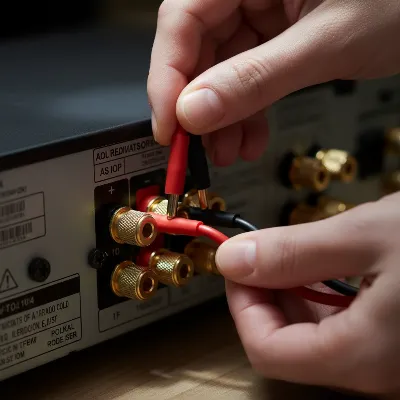 Hands inserting banana plugs into AV receiver binding posts
3. Spade Connectors
Spade connectors offer a larger contact area than bare wire and are secured by tightening the binding post nut over the spade.
- Prepare the Wire: Strip insulation and twist strands.
- Attach Spade Connector: Secure the bare wire into the spade connector, usually by crimping or soldering.
- Connect to Terminal: Unscrew the binding post nut, slide the spade connector around the central metal post (or into the slot), and tighten the nut firmly over the spade to hold it in place.
4. Pin Connectors
Pin connectors are similar to bare wire ends but provide a solid, pre-formed tip for easier insertion into spring clips or the side holes of binding posts, tidying up stray strands.
- Prepare the Wire: Strip insulation and twist strands.
- Attach Pin Connector: Secure the bare wire into the pin connector, usually by crimping or soldering.
- Connect to Terminal: Insert the pin connector into the spring clip opening or the side hole of a binding post.
Impedance Matching for Optimal Performance
Impedance, measured in ohms (Ω), is the electrical resistance a speaker presents to your AV receiver. Matching your speaker’s impedance to your receiver’s capabilities is crucial for safe operation and optimal sound quality.
- Check Specifications: Always refer to both your AV receiver and speaker manuals for their impedance ratings. Most speakers are rated at 4Ω, 6Ω, or 8Ω.
- The Golden Rule: Ideally, match the speaker’s nominal impedance to the amplifier’s rated impedance. For example, connect an 8Ω speaker to an amplifier rated for 8Ω.
- Lower Impedance Speakers: Speakers with lower impedance (e.g., 4Ω) demand more current from the amplifier, making it work harder and generate more heat. Ensure your receiver is explicitly rated to handle such loads. Connecting a 4Ω speaker to a receiver only rated for 8Ω can lead to overheating, distortion, or even damage to the receiver.
- Receiver Settings: Many modern receivers are designed to handle moderate impedance mismatches. Some may have a switch or setting to select the speaker impedance (e.g., 4Ω, 6Ω, or 8Ω). If your speakers have an impedance dip to 4Ω but are nominally 6Ω or 8Ω, setting your receiver to the higher 8Ω setting is often recommended. This can prevent the receiver from unnecessarily limiting its power output to protect circuitry, ensuring optimal performance.
- Ventilation: Regardless of impedance, always ensure your AV receiver has ample ventilation, especially if it’s driving lower impedance speakers, as they can cause it to run hotter.
Routing and Organizing Your Speaker Wires
After making the connections, proper wire routing and organization are essential for both safety and aesthetics.
- Avoid Interference: Route speaker wires away from power cables, fluorescent lights, and other electrical cables to prevent electromagnetic interference (EMI) that can cause hum or noise.
- Prevent Hazards: Lay wires where they won’t be tripped over. Use wire channels, floor molding, or adhesive clips along baseboards or under furniture. Never run wires under carpets in high-traffic areas where they can be crushed, as this can damage the wires and create fire hazards.
- Secure and Tidy: Use cable ties or Velcro straps to bundle wires neatly. This not only improves the appearance of your setup but also makes troubleshooting easier if an issue arises.
- Leave Slack: Leave small loops of slack, typically 6-12 inches (15-30 cm), at both the speaker and receiver ends. This slack allows for easier adjustments, component swaps, or repositioning without straining the connections. However, avoid excessive slack, as it can contribute to clutter and potential signal degradation over very long, coiled lengths.
Post-Connection Steps: Calibration and Testing
Once all your speakers are securely wired to your AV receiver:
- Double-Check Connections: Before powering on, visually inspect every connection point. Ensure all positive and negative terminals are correctly matched and that no stray wire strands are touching opposing terminals or the receiver’s chassis.
- Power On and Test: Plug in your AV receiver and power it on. Start with the volume at its lowest setting. Play some audio to confirm sound is coming from all speakers.
- Run Auto-Calibration: Most AV receivers come with a setup microphone and an auto-calibration feature (e.g., Audyssey, MCACC, YPAO). This process will measure your speakers’ distances, levels, and crossover points relative to your listening environment, optimizing sound performance for your room. Follow your receiver’s manual for specific instructions.
- Fine-Tune: After auto-calibration, you can make minor adjustments to individual speaker levels, equalization, or crossover settings to suit your personal preferences.
Wiring your home speakers to an AV receiver safely and correctly is a rewarding process that lays the foundation for an exceptional audio experience. By understanding wire gauges, respecting polarity, ensuring proper impedance matching, and utilizing secure connection methods like banana plugs, you minimize risks and maximize performance. Take your time, follow these guidelines, and you’ll soon be enjoying rich, immersive sound that truly brings your movies, music, and games to life.
Frequently Asked Questions
Frequently Asked Questions
What happens if I reverse speaker wire polarity?
Reversing speaker wire polarity causes the speaker to be out of phase, leading to phase cancellation, diminished bass response, and a thinner, less impactful sound. While generally not damaging at normal listening levels, it severely degrades sound quality.
Is bare wire or banana plugs better for sound quality?
Electrically, there is no significant sound quality advantage between properly terminated bare wire and banana plugs for most listeners. However, banana plugs offer convenience, a more secure connection, reduce frayed wires, and prevent short circuits, indirectly contributing to a better audio experience.
Can I use different gauge wires for different speakers?
Yes, you can use different gauge wires for different speakers if necessary. For instance, a thicker 12-gauge wire might be used for long runs to front speakers, while a thinner 16-gauge wire is suitable for shorter runs to surround speakers, provided each gauge is appropriate for its specific application and length.
How much slack should I leave in speaker wires?
It is recommended to leave 6-12 inches (15-30 cm) of slack at both the speaker and receiver ends. This allows for easier adjustments, component swaps, or repositioning without straining connections. Avoid excessive slack to prevent clutter and potential signal degradation over very long, coiled lengths.
What is the ideal speaker wire gauge for home theater systems?
For most home theater systems and speaker runs under 50 feet (approximately 15 meters), 16-gauge speaker wire is typically sufficient. For longer runs or high-power amplifiers, a thicker 14-gauge or 12-gauge wire is advisable to minimize power loss.
How to Safely Wire Home Speakers to an AV Receiver
This guide outlines the steps to safely and correctly wire your home speakers to an AV receiver for optimal audio performance.
Measure and cut speaker wires to the optimal length, leaving 6-12 inches of slack. Carefully strip about u00bd inch (1.25 cm) of insulation from both ends, ensuring not to nick copper strands. Twist the exposed copper strands clockwise into a tight point to prevent short circuits.
Choose your connection method: bare wire for spring clips or binding posts, or use banana plugs, spade, or pin connectors. For bare wire, insert into the terminal and secure. For banana plugs, attach to the wire and push firmly into the binding post. Ensure crucial polarity matching (positive to positive, negative to negative) to avoid phase issues.
Verify your speaker's impedance (ohms) matches your AV receiver's capabilities. Most speakers are 4u03a9, 6u03a9, or 8u03a9. Connecting a 4u03a9 speaker to a receiver rated only for 8u03a9 can cause overheating. Adjust receiver settings if available to match impedance, and ensure ample ventilation.
Route speaker wires away from power cables to prevent electromagnetic interference. Use wire channels or clips to prevent tripping hazards. Secure wires neatly with cable ties or Velcro straps, maintaining the 6-12 inches of slack at each end for future adjustments.
Double-check all connections for correct polarity and no stray strands. Power on your AV receiver at a low volume and play audio to confirm sound from all speakers. Run the auto-calibration feature (e.g., Audyssey) with the setup microphone to optimize sound for your room, then fine-tune as desired.

This guide saved me a ton of headache! I was about to just wing it with my new Yamaha receiver and speakers, but the emphasis on powering off all components first was a crucial safety reminder. Everything works perfectly, and the sound is crystal clear. Highly recommend following these steps.
The advice on using 16-gauge wire for runs under 50 feet was spot on for my setup. I had some thinner wire before and noticed a definite improvement in sound quality after switching. However, I found the section on understanding your AV receiver a little basic; I was hoping for more advanced tips there.
I’ve always been a bit intimidated by wiring, but the clear instructions on matching speaker polarity made all the difference. My new Denon receiver sounds incredible with my existing speakers now. It really helped me get the most out of my home theater setup without any buzzing or weird audio issues.
Using banana plugs was a game-changer for securing my connections. I used to just twist the wires, but this method is so much cleaner and more reliable. My only minor gripe is that I wish there was a bit more detail on troubleshooting if you get no sound at all, but overall, super helpful.