When an AV receiver won’t turn on, it often indicates an underlying issue that can be resolved with simple DIY steps, such as verifying power connections, checking circuit breakers, performing a power cycle, or inspecting speaker wiring for shorts. Before seeking costly professional repairs, systematically diagnose the problem to restore your audio-visual hub.
Initial Checks: The Simplest Solutions
Before delving into complex diagnostics, it’s essential to rule out the most common and easily rectifiable culprits. Many power-on issues stem from basic connectivity problems or environmental factors.
Power Connection Verification
The first and most obvious step is to ensure your AV receiver is properly connected to a working power source. Begin by checking the power cable itself. Is it securely plugged into the back of the receiver and firmly seated in the wall outlet or power strip? A loose connection is a surprisingly frequent cause of no-power situations. Try unplugging and re-plugging both ends of the cable. If you’re using a power strip or surge protector, ensure it’s switched on and functioning correctly. You might test another device in the same outlet to confirm it has power. A faulty power cable can also be the culprit; if you have a spare, try swapping it out.
Outlet and Circuit Breaker Check
Sometimes, the issue isn’t with the receiver but with the power supply to the outlet. Plug another small appliance (like a lamp or phone charger) into the same outlet where your receiver was connected to verify if the outlet is live. If the outlet is dead, check your home’s electrical panel for a tripped circuit breaker. Circuit breakers trip to prevent electrical overloads and potential damage. If you find a tripped breaker, switch it off completely, then firmly switch it back on. If the breaker trips again immediately, there’s a larger electrical issue that requires an electrician.
Remote Control and Front Panel Test
It’s worth checking if the power button on your remote control or the front panel of the receiver is faulty. Try powering the receiver on using both methods. If one works and the other doesn’t, it indicates a problem with the button itself or the remote’s batteries. For the remote, replace the batteries. If the front panel button is unresponsive, but the remote works, you might have a minor internal switch issue, though this is less common for a complete “no power” scenario.
Basic Troubleshooting Steps
Once you’ve confirmed basic power integrity, you can move on to slightly more involved, yet still DIY-friendly, troubleshooting methods. These often involve resetting the unit or isolating potential short circuits.
Resetting the AV Receiver
|
Our Picks for the Best AV Receiver in 2026
As an Amazon Associate I earn from qualifying purchases.
|
||
| Num | Product | Action |
|---|---|---|
| 1 | Sony STR-AN1000 7.2 CH Surround Sound Home Theater 8K A/V Receiver: Dolby Atmos, DTS:X, Digital Cinema Auto Calibration IX, Bluetooth, WiFi, Google Chromecast, Spotify connect, Apple AirPlay, HDMI 2.1 |

|
| 2 | Denon AVR-S570BT AV Receiver 5.2 Channel 8K Ultra HD Audio & Video, Stereo Receivers, Denon AVR Wireless Streaming Bluetooth, (4) 8K HDMI Inputs, eARC, HD Setup Assistant |
|
| 3 | Sony STRDH590 5.2 Channel Surround Sound Home Theater Receiver: 4K HDR AV Receiver with Bluetooth,Black |
|
| 4 | Denon AVR-X1800H 7.2 Channel AV Stereo Receiver - 80W/Channel, Wireless Streaming via Built-in HEOS, WiFi, & Bluetooth, Supports Dolby Vision, HDR10+, Dynamic HDR, & Home Automation Systems |
|
| 5 | Sony STRDH190 2-ch Home Stereo Receiver with Phono Inputs & Bluetooth Black |
|
| 6 | YAMAHA RX-V385 5.1-Channel 4K Ultra HD AV Receiver with Bluetooth |
|
| 7 | Pyle 5.2 Channel Hi-Fi Home Theater Receiver - 1000W MAX Wireless BT Surround Sound Stereo Amplifier System with 4k Ultra HD Support, MP3/USB/DAC, Ideal for Immersive Home Audio Experience |
|
| 8 | Sony STRDH590 5.2 Multi-Channel 4k HDR AV Receiver with Bluetooth (Renewed) Bundle with 3 YR CPS Enhanced Protection Pack |
|
| 9 | Denon AVR-X1700H 7.2 Channel AV Receiver - 80W/Channel, Advanced 8K HDMI Video w/eARC, Dolby Atmos, DTS:X, Built-in HEOS, Amazon Alexa Voice Control |
|
| 10 | Onkyo TX-RZ30 9.2-Channel AV Receiver - 100 Watts Per Channel, Dirac Live Out of Box, Works with Sonos Certified, THX Certified and More |
|
A common first advanced step is to perform a power cycle or a soft reset. Unplug your AV receiver from the wall outlet completely. It’s often recommended to leave it unplugged for at least 30 minutes. This allows any residual electrical charge stored in the capacitors to dissipate fully, which can sometimes clear internal glitches or reset a tripped internal protection circuit. While it’s unplugged, you can also press and hold the power button on the receiver for about 30 seconds to further help drain any remaining power. After the waiting period, plug the receiver back in and attempt to power it on.
Some receivers may also have a specific factory reset procedure, which might be accessible even if the unit doesn’t fully power on. This usually involves holding down a combination of buttons (like “Tone” and “Straight” for some Yamaha models, or specific buttons for Sony/Denon) while plugging in the unit or pressing the power button. Consult your receiver’s manual for model-specific instructions on performing a factory reset or diagnostic mode entry. This can clear software-related issues that might prevent startup.
Checking for Overload Protection
Many modern AV receivers feature protection circuitry that automatically shuts down the unit to prevent damage from electrical surges, overheating, or speaker issues. If your receiver displays “PROTECT” or “PROTECTOR” on its display (even briefly) or shuts down shortly after turning on, it’s likely in protection mode.
> “Overload protection is a critical safety feature in AV receivers, designed to safeguard internal components from damage due to excessive current or short circuits. It’s the receiver’s way of telling you something is amiss and needs attention.” – John Smith, Lead AV Technician
To resolve this:
- Disconnect all speaker wires: Turn off and unplug the receiver. Disconnect all speaker wires from the back of the receiver. Ensure no bare wires are touching each other or the receiver chassis.
- Check speaker impedance: Ensure your speakers’ impedance (typically 4-8 ohms) matches or is within the recommended range for your receiver. Mismatched impedance, especially speakers with too low an impedance, can cause the receiver to enter protection mode, particularly at higher volumes.
- Ventilation: Ensure the receiver has adequate ventilation. Overheating can trigger protection mode. Clear any obstructions around the vents and ensure it’s not enclosed in a cabinet without proper airflow.
After addressing these points, plug the receiver back in and try to power it on without any speakers connected. If it powers on successfully, turn it off, then reconnect one speaker at a time, powering on and testing after each connection, until you identify the problematic speaker or wire.
Inspecting Speaker Wires for Shorts
Frayed or shorted speaker wires are a very common cause of an AV receiver entering protection mode or failing to power on. Even a single strand of wire accidentally touching another terminal or the receiver’s chassis can create a short circuit.
- Visual Inspection: With the receiver unplugged, carefully inspect all speaker wires. Look for any exposed copper strands that might be touching other wires, the receiver’s metal casing, or the opposing (positive/negative) terminal.
- Re-terminate Wires: If you find frayed wires, cut off the damaged section and re-strip the insulation, ensuring only the appropriate length of bare wire is exposed for connection. Banana plugs or pin connectors can help prevent accidental shorts.
- Check Polarity: While less likely to prevent power-on, ensure all speaker wires maintain correct polarity (positive to positive, negative to negative) from the receiver to the speakers.
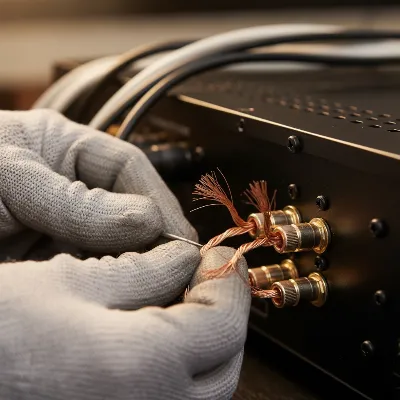 A close-up view of hands carefully inspecting speaker wires for frayed ends and potential short circuits near the binding posts of an AV receiver.
Deeper Diagnostics for Persistent Issues
If the initial and basic troubleshooting steps haven’t revived your receiver, it’s time for some more advanced diagnostics. These steps may require a multimeter and a basic understanding of electronics. Always unplug the receiver before opening the case or performing internal checks.
Testing with Minimal Connections
To truly isolate the problem, try powering on the receiver with the absolute minimum connections. This means:
- Unplug all HDMI cables, optical cables, RCA cables, and network cables.
- Ensure all speaker wires are disconnected.
- Connect only the power cord.
Attempt to power on the receiver. If it now turns on, systematically reintroduce one connection at a time, powering the unit off and on after each connection, until the problem reappears. This helps pinpoint if an external device or faulty cable is causing the issue. A shorted HDMI cable, for instance, can sometimes prevent a receiver from powering up or cause it to enter protection mode.
Firmware Update Considerations
While typically performed when a receiver is operational, an outdated or corrupted firmware could theoretically contribute to startup issues. If you can get the receiver to power on, even momentarily, check if a firmware update is available for your model. Manufacturers occasionally release updates that resolve bugs or improve system stability. Refer to your receiver’s manual or the manufacturer’s website for instructions on how to check for and apply firmware updates.
Internal Fuse Inspection (with caution)
Many AV receivers have one or more internal fuses designed to blow and protect the internal components from overcurrent. If a fuse has blown, the receiver won’t power on. This step involves opening the receiver’s case and should only be attempted if you are comfortable working with electronics and understand the risks involved.
- Safety First: Absolutely ensure the receiver is unplugged from the wall outlet and has been unplugged for at least 30 minutes to allow capacitors to discharge.
- Open the Case: Carefully remove the screws holding the top cover of the receiver.
- Locate Fuses: Look for small cylindrical glass fuses or ceramic fuses, usually located near the power input board, power supply, or amplifier sections. Some older receivers might have accessible fuses on the back panel.
- Visual Check: A blown glass fuse will typically have a visibly broken or blackened wire inside. Ceramic fuses are opaque, so visual inspection is not possible.
- Multimeter Test (Recommended): To definitively test a fuse, set your multimeter to continuity mode (often indicated by a beeping symbol or Ohm symbol). With the receiver unplugged and the fuse removed from its holder, touch one probe to each end of the fuse. A good fuse will show continuity (a beep or a reading near 0 ohms). A blown fuse will show no continuity (no beep or an “OL” reading).
- Replacement: If a fuse is blown, replace it with an identical fuse (same amperage and voltage rating). Never use a fuse with a higher rating, as this can lead to severe damage to the receiver or even fire.
Important Note: A blown fuse is often a symptom, not the root cause. Something caused the fuse to blow. If a new fuse blows immediately, there’s a deeper internal problem that likely requires professional attention.
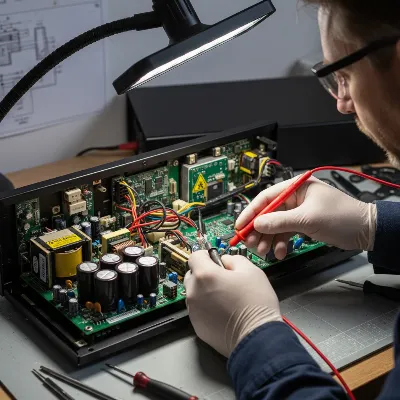 A technician using a multimeter to check the continuity of an internal fuse within an open AV receiver, with clear safety precautions visible.
When to Call a Professional
While many common issues can be resolved with DIY troubleshooting, there are situations where professional repair is necessary. Knowing when to stop and seek expert help can save you from further damage and expense.
Signs Your Receiver Needs Expert Repair
- Repeated Blown Fuses: If you replace a blown fuse and the new one blows immediately, it indicates a significant internal short circuit or component failure that is beyond typical DIY repair.
- Burning Smell or Visible Damage: A burning smell, visible scorch marks, bulging capacitors, or other signs of internal component damage (beyond a simple fuse) are clear indicators to stop troubleshooting and seek professional help.
- No Power After Extensive DIY: If you’ve gone through all the basic and intermediate troubleshooting steps diligently and the receiver still won’t power on, it likely points to a more complex power supply board failure, main board issue, or amplifier problem that requires specialized tools and expertise to diagnose and repair.
- Error Codes Indicating Specific Component Failure: Some receivers might display cryptic error codes that, when looked up in the manual, point to specific internal component failures (e.g., DSP error, amplifier fault).
- Your Comfort Level: If you are uncomfortable opening the case, working with electricity, or using a multimeter, it’s always safer to consult a qualified technician.
Reputable AV Receiver Brands and Service Centers
When professional repair is needed, it’s wise to contact the manufacturer’s authorized service center or a highly-rated independent electronics repair shop specializing in AV equipment. Brands like Yamaha, Denon, Onkyo, Marantz, Pioneer, and Sony generally have robust support networks. Look for technicians with experience specifically with AV receivers, as they understand the nuances of these complex devices. Check online reviews and ask for estimates before committing to a repair. Sometimes, for older or less expensive receivers, the cost of repair might approach or exceed the cost of a new replacement, making it a difficult but necessary decision.
Conclusion
A non-responsive AV receiver doesn’t always spell disaster. By systematically working through common troubleshooting steps—from verifying power connections and checking circuit breakers to performing resets and inspecting speaker wiring—you can often pinpoint and resolve the issue yourself. Remember to always prioritize safety by unplugging the unit before any internal inspection. If after these efforts your AV receiver remains stubbornly off, it’s a strong indicator that the problem lies deeper within the electronics, signaling the time to seek out a qualified professional.
What specific troubleshooting step revived your AV receiver? Share your experiences and tips below!
Frequently Asked Questions
Why does my AV receiver go into “protection mode” and shut off?
Protection mode is a safety feature that triggers when the receiver detects an issue like a short circuit in speaker wiring, excessive current draw due to incorrect speaker impedance, or overheating. It shuts down to prevent damage to internal components. Disconnecting all speakers and carefully checking wiring for shorts are common first steps to resolve this.
Can a bad HDMI cable prevent an AV receiver from turning on?
Yes, in some rare cases, a severely damaged or shorted HDMI cable connected to the receiver could potentially cause issues that prevent it from powering on or cause it to enter a protection state. Disconnecting all external devices, including HDMI cables, is a useful troubleshooting step to rule out external interference.
How often should I check my AV receiver’s internal fuses?
You generally only need to check internal fuses if your receiver completely fails to power on after you’ve exhausted all other external and basic troubleshooting steps. Fuses are designed to be a last line of defense and typically blow only when there’s an underlying electrical fault. They are not part of routine maintenance.
Is it safe to replace a blown fuse in my AV receiver myself?
You can replace a blown fuse yourself if you are comfortable with basic electronics, understand how to safely open the receiver’s case, and can correctly identify and match the fuse specifications (amperage, voltage, type). Always ensure the receiver is unplugged for at least 30 minutes before opening it. If the new fuse blows immediately, seek professional help, as it indicates a more serious internal issue.
My AV receiver smells like something is burning. What should I do?
Immediately unplug the AV receiver from the wall outlet and do not attempt to power it on again. A burning smell indicates a serious internal electrical fault, potentially involving damaged components or wiring. Attempting to restart it could worsen the damage or pose a fire hazard. It requires professional inspection and repair.
Fix an AV Receiver That Won't Turn On
This guide provides systematic steps to diagnose and potentially fix an AV receiver that refuses to power on, covering basic checks to deeper diagnostics.
Ensure the AV receiver's power cable is securely plugged into both the receiver and a working wall outlet or power strip. Test the outlet with another device and check your home's circuit breaker for any trips. A loose connection or dead outlet is a common cause of no power.
Unplug the AV receiver from the wall for at least 30 minutes to allow residual electrical charge to dissipate, which can clear internal glitches. While unplugged, press and hold the receiver's power button for 30 seconds. Consult your manual for model-specific factory reset procedures.
Disconnect all speaker wires from the receiver and inspect them for frayed strands or shorts. Ensure speaker impedance matches your receiver's specifications (typically 4-8 ohms) and that the receiver has adequate ventilation. Reconnect speakers one by one to identify any problematic connections.
Unplug all HDMI, optical, RCA, and network cables, leaving only the power cord connected. Attempt to power on the receiver. If it turns on, systematically reintroduce each connection, powering the unit off and on, to pinpoint if an external device or faulty cable is causing the issue.
If comfortable with electronics, unplug the receiver for 30 minutes, then open the case to locate and visually inspect internal fuses. Use a multimeter to test for continuity. Replace any blown fuses with identical amperage and voltage ratings. If a new fuse blows immediately, seek professional repair.

This guide was super helpful when my Yamaha receiver decided to play dead. The tip about checking the circuit breaker was something I hadn’t even considered, and it turned out to be the issue. It’s a relief to know these things can often be fixed without calling a technician. Saved me a service call fee!
Fantastic advice! My Marantz receiver was completely unresponsive, and I was about to give up. The detailed instructions on verifying power connections were key. Turns out, the cable had just worked itself a little loose from the wall outlet. A quick push and everything was back to normal. Highly recommend these DIY steps.
I tried all the suggestions, including checking the speaker wiring for shorts, but my Onkyo receiver is still not turning on. The steps were clear, but unfortunately, it didn’t solve my specific problem. It seems like I might have a more serious internal issue, which is a bummer. Still, good to have a checklist.
My Denon receiver suddenly wouldn’t power on, and I was dreading having to buy a new one. Following the steps here, especially the power cycle, actually fixed it! I thought it was a goner for sure, but a simple reset brought it back to life. So glad I didn’t have to spend hundreds on a replacement.