Investing in a new AV receiver is a thrilling step towards transforming your home entertainment into an immersive experience. This central hub for your audio and video components promises stunning sound and crystal-clear visuals, but like any sophisticated electronic device, it thrives on proper care. Understanding and implementing essential maintenance tips will not only ensure your AV receiver performs at its peak, delivering that coveted high-fidelity audio and seamless video, but also significantly extend its lifespan, protecting your valuable investment for years to come.
What is an AV Receiver and Why Does it Need Maintenance?
An AV receiver serves as the brain of your home theater system, handling a multitude of tasks from receiving audio and video signals to processing them and sending them to your speakers and display. It integrates diverse sources like Blu-ray players, gaming consoles, streaming devices, and televisions, amplifying audio signals for your speakers. This complex piece of equipment is crucial for achieving high-quality sound, versatile connectivity, and easy control over your entire entertainment setup.
Given its central role and the intricate electronics within, an AV receiver generates heat and can accumulate dust, both of which are detrimental to its performance and longevity. Regular maintenance ensures consistent audio quality, prevents overheating that can damage internal components, and keeps all connections secure for an uninterrupted entertainment experience. Neglecting these simple steps can lead to diminished sound, connectivity issues, and premature failure, undermining the very benefits it promises.
Common Threats to Your AV Receiver’s Longevity
Several factors can impact the lifespan of your AV receiver, turning a long-term investment into a short-lived one if overlooked. Being aware of these common threats is the first step in proactive maintenance.
Overheating is arguably the biggest enemy of electronic devices. AV receivers contain powerful amplifiers that generate considerable heat during operation. If this heat isn’t properly dissipated, it can degrade internal components like capacitors and integrated circuits, leading to reduced performance and eventual failure. Poor ventilation, placing the receiver in an enclosed space, or even consistently overdriving it with very high volumes can contribute to overheating.
Dust accumulation is another silent killer. Over time, dust and debris can settle on the exterior and, more critically, within the receiver’s vents and internal components. This blanket of dust acts as an insulator, trapping heat and further exacerbating overheating issues. It can also interfere with electrical contacts and impede the performance of cooling fans.
Loose or corroded connections can degrade signal quality, causing intermittent audio or video, and in some cases, lead to more serious electrical issues. Cables can naturally loosen over time due to vibration or movement, while corrosion can build up on metal contacts, hindering proper signal transmission.
Power surges from electrical grid fluctuations or lightning strikes can instantly fry sensitive internal circuitry. Even minor power fluctuations can cause cumulative stress on components, shortening their lifespan.
Finally, component wear is inevitable over decades of use. Capacitors can dry out, potentiometers (like volume controls) can wear, and switch contacts can oxidize. While these are part of natural aging, proper maintenance can significantly slow down this process.
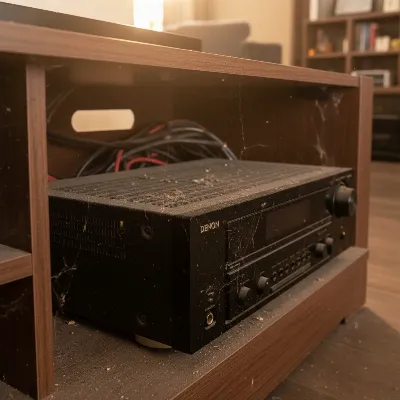 An AV receiver in a cluttered, poorly ventilated cabinet, showing dust accumulation on vents, illustrating common threats to longevity.
Your Essential AV Receiver Maintenance Checklist
Maintaining your AV receiver doesn’t require advanced technical skills, but rather consistent attention to a few key areas. Following this checklist will help ensure your system delivers peak performance for years.
Ensure Optimal Ventilation
|
Our Picks for the Best AV Receiver in 2026
As an Amazon Associate I earn from qualifying purchases.
|
||
| Num | Product | Action |
|---|---|---|
| 1 | Denon AVR-S570BT AV Receiver 5.2 Channel 8K Ultra HD Audio & Video, Stereo Receivers, Denon AVR Wireless Streaming Bluetooth, (4) 8K HDMI Inputs, eARC, HD Setup Assistant |

|
| 2 | Pyle 5.2 Channel Hi-Fi Home Theater Receiver - 1000W MAX Wireless BT Surround Sound Stereo Amplifier System with 4k Ultra HD Support, MP3/USB/DAC, Ideal for Immersive Home Audio Experience |
|
| 3 | YAMAHA RX-V385 5.1-Channel 4K Ultra HD AV Receiver with Bluetooth |
|
| 4 | Sony STRDH190 2-ch Home Stereo Receiver with Phono Inputs & Bluetooth Black |
|
| 5 | Sony STRDH590 5.2 Channel Surround Sound Home Theater Receiver: 4K HDR AV Receiver with Bluetooth,Black |
|
| 6 | Sony STRDH590 5.2 Multi-Channel 4k HDR AV Receiver with Bluetooth (Renewed) Bundle with 3 YR CPS Enhanced Protection Pack |
|
| 7 | Denon AVR-X1800H 7.2 Channel AV Stereo Receiver - 80W/Channel, Wireless Streaming via Built-in HEOS, WiFi, & Bluetooth, Supports Dolby Vision, HDR10+, Dynamic HDR, & Home Automation Systems |
|
| 8 | Onkyo TX-RZ30 9.2-Channel AV Receiver - 100 Watts Per Channel, Dirac Live Out of Box, Works with Sonos Certified, THX Certified and More |
|
| 9 | Sony STR-AN1000 7.2 CH Surround Sound Home Theater 8K A/V Receiver: Dolby Atmos, DTS:X, Digital Cinema Auto Calibration IX, Bluetooth, WiFi, Google Chromecast, Spotify connect, Apple AirPlay, HDMI 2.1 |
|
| 10 | Denon AVR-X1700H 7.2 Channel AV Receiver - 80W/Channel, Advanced 8K HDMI Video w/eARC, Dolby Atmos, DTS:X, Built-in HEOS, Amazon Alexa Voice Control |
|
Proper airflow is paramount for your AV receiver’s health. Think of it as allowing your receiver to breathe freely. Ensure there is ample space around all sides of the unit, particularly above it, to allow heat to escape effectively.
Avoid placing your receiver in enclosed cabinets with no air circulation. If cabinet placement is unavoidable, consider installing a dedicated cooling fan system to draw hot air out and introduce cooler air. Never block the top panel openings, which are designed for warm air to escape, or the bottom panel openings, which allow cool air to enter. Adequate spacing, ideally several inches on all sides and above, is a simple yet highly effective preventative measure.
Keep It Clean and Dust-Free
Regular cleaning is vital, both for aesthetics and internal health. Always unplug your AV receiver from the AC power before performing any deep cleaning to prevent electrical hazards.
For the exterior, use a soft, dry microfiber cloth to gently wipe away dust and fingerprints from the surface, dials, and knobs. For stubborn grime, a slightly damp microfiber towel can be used, ensuring no liquid directly touches the unit. To tackle dust around delicate areas like terminals and connectors, a cotton swab can be very effective.
For the interior, which accumulates the most heat-trapping dust, compressed air is your best friend. Carefully open the receiver’s case if you are comfortable, then use short bursts of compressed air to blow dust out of vents, fans, and internal components. Keep the nozzle a few inches away from the components to avoid damage. A soft brush, like a clean makeup brush or a soft vacuum brush, can also help dislodge stubborn dust before using compressed air. Never use water or liquid cleaners inside the unit, as moisture can severely damage sensitive electronic parts. A thorough internal cleaning once or twice a year is generally sufficient, complemented by weekly external wipe-downs.
Check and Secure All Connections
Over time, cables connected to your AV receiver can loosen or become corroded, leading to signal degradation or complete loss. Regularly inspect all connections, including HDMI, optical, RCA, and speaker wire terminals.
Ensure all cables are securely plugged in and tightened. If you notice any loose connections, gently tighten them. For speaker wire connections, confirm there are no stray strands of wire that could cause a short circuit. If you observe any corrosion on metal contacts, a specialized contact cleaner can be used, though always with caution and following the product’s instructions. Using high-quality cables from the outset can also provide more reliable and secure connections.
Protect Against Power Issues
Power fluctuations and surges are a silent threat that can cause immediate or cumulative damage to your AV receiver. A robust surge protector is an inexpensive yet crucial investment to shield your equipment from sudden voltage spikes.
For areas with unstable electricity, a servo-type voltage regulator with a delay can offer even greater protection by stabilizing incoming power and preventing surges upon power return after an outage. It is also a good practice to turn off and unplug your AV receiver if you plan to be away for an extended period or during severe electrical storms to minimize risk.
Keep Firmware Up-to-Date
Manufacturers frequently release firmware updates for AV receivers. These updates can include bug fixes, performance enhancements, new features, and improved compatibility with other devices. Running outdated firmware can lead to connectivity issues, audio/video synchronization problems, or a lack of support for the latest technologies.
Periodically check your receiver’s manufacturer website or menu settings for available firmware updates. Most modern receivers with network connectivity can download and install updates directly. Always follow the manufacturer’s instructions carefully during the update process to avoid bricking the device.
When to Call a Professional: Knowing Your Limits
While many maintenance tasks are straightforward and can be performed at home, there are situations where professional intervention is necessary. Knowing when to call an expert can prevent further damage and ensure safe, effective repairs.
DIY maintenance primarily focuses on external cleaning, ensuring ventilation, checking connections, and basic firmware updates. However, for internal component replacements, such as dried-out capacitors (a process known as “re-capping” in the audio world), or for diagnosing complex electrical faults, a qualified technician is essential. These tasks require specialized tools, knowledge of electronics, and experience to perform safely and correctly. Attempting complex internal repairs without proper expertise can lead to irreversible damage or even personal injury.
If your AV receiver exhibits consistent issues like persistent overheating despite good ventilation, sudden loss of sound or video not attributable to connections, or strange noises from within, it’s a strong indicator to seek professional help. A technician can accurately diagnose the problem, replace worn-out components, and calibrate your system for optimal performance.
> “Regular preventative measures, especially concerning ventilation and cleanliness, are the bedrock of AV receiver longevity. But for any deep-seated issues or internal component wear, trust a certified audio technician.” – John Davis, Senior AV Systems Engineer
Conclusion
Your new AV receiver is designed to be the heart of your home entertainment, delivering breathtaking audio and visual experiences. By embracing these essential maintenance tips – from ensuring optimal ventilation and keeping it meticulously clean to securing connections, protecting against power issues, and updating firmware – you are actively preserving its performance and extending its life. These simple, proactive steps minimize common threats like overheating and dust, ensuring your system remains a reliable source of enjoyment. a well-maintained AV receiver isn’t just a functional device; it’s a gateway to an unparalleled sonic journey. What new movies or music will you discover with your optimally performing AV receiver?
Frequently Asked Questions
How often should I clean my AV receiver?
It’s recommended to wipe down the exterior of your AV receiver weekly with a soft cloth. A more thorough internal cleaning with compressed air and a soft brush should be performed once or twice a year, or more frequently if you live in a dusty environment. Always unplug the unit before deep cleaning.
Can I use a vacuum cleaner to clean the inside of my AV receiver?
While some light vacuuming around exterior vents with a soft brush attachment is acceptable, it’s generally not recommended to use a powerful vacuum cleaner directly on internal components. The static electricity generated can damage sensitive electronics. Compressed air is a safer and more effective option for internal dust removal.
Does leaving my AV receiver on 24/7 shorten its lifespan?
Leaving your AV receiver on constantly can potentially shorten its lifespan due to continuous heat generation and wear on components like capacitors. While some believe it helps maintain a stable temperature, the consensus is that turning it off when not in use for extended periods (e.g., overnight or for several hours) is better for longevity and saves energy. Most modern receivers have a standby mode for quick startup.
Frequently Asked Questions
How often should I clean my AV receiver?
The exterior of your AV receiver should be wiped down weekly with a soft cloth. A more thorough internal cleaning using compressed air and a soft brush is recommended once or twice a year, or more frequently in dusty environments. Always unplug the unit before deep cleaning to prevent electrical hazards.
Can a vacuum cleaner be used to clean the inside of an AV receiver?
Using a powerful vacuum cleaner directly on internal components is generally not recommended due to the risk of static electricity damaging sensitive electronics. Compressed air is a safer and more effective method for internal dust removal. Light vacuuming around exterior vents with a soft brush attachment is acceptable.
Does leaving an AV receiver on constantly shorten its lifespan?
Leaving your AV receiver on 24/7 can potentially shorten its lifespan due to continuous heat generation and wear on internal components like capacitors. Turning it off when not in use for extended periods, such as overnight, is generally better for longevity and also conserves energy. Most modern receivers offer a standby mode for quick startup.
What are the biggest threats to an AV receiver's longevity?
The biggest threats to an AV receiver's longevity include overheating, dust accumulation, loose or corroded connections, and power surges. Overheating can degrade internal components, while dust acts as an insulator, exacerbating heat issues. Power surges can instantly damage sensitive circuitry.
When should I call a professional for AV receiver repair?
You should call a professional technician for internal component replacements, such as dried-out capacitors, or for diagnosing complex electrical faults. If your AV receiver exhibits persistent overheating despite good ventilation, sudden loss of sound or video not due to connections, or strange internal noises, professional help is necessary.
Maintain Your AV Receiver for Longevity
Follow these steps to ensure your AV receiver performs optimally and lasts for many years, preventing common issues like overheating and dust accumulation.
Provide ample space around all sides of your AV receiver, especially above it, to allow heat to escape effectively. Avoid enclosed cabinets or install a dedicated cooling fan system if cabinet placement is unavoidable. Never block the top or bottom panel openings.
Unplug your AV receiver from AC power before cleaning. Use a soft, dry microfiber cloth for the exterior weekly. For the interior, use short bursts of compressed air once or twice a year to blow dust out of vents and components, keeping the nozzle a few inches away.
Regularly inspect all HDMI, optical, RCA, and speaker wire terminals for looseness or corrosion. Gently tighten any loose connections and ensure no stray speaker wire strands are present. Use a specialized contact cleaner for corrosion if necessary.
Invest in a robust surge protector to shield your equipment from sudden voltage spikes. For unstable electricity, consider a servo-type voltage regulator. Turn off and unplug your AV receiver during extended absences or severe electrical storms.
Periodically check your receiver's manufacturer website or menu settings for available firmware updates. Most modern receivers can download and install updates directly. Always follow the manufacturer's instructions carefully during the update process.

I’ve had my Denon receiver for years and always wondered if I was doing enough to keep it running. The tip about checking the ventilation and making sure there’s enough space around the unit was a great reminder. I cleared out some clutter and already feel better about its airflow. Definitely want to protect this investment!
Good advice on keeping the connections clean. I used to just plug and play, but after reading about how dust can impact signal quality, I took the time to gently clean all the HDMI and speaker wire terminals. My sound seems a little crisper now, or maybe it’s just my imagination! Either way, it’s a simple step that makes sense.
I never really thought about power conditioning for my AV receiver until now. I always just plugged it into a regular surge protector. The explanation about protecting against voltage spikes and noise interference makes a lot of sense for maintaining high-fidelity audio. I’m definitely looking into a dedicated power conditioner for my setup.
The advice on firmware updates is solid, but I wish there was more detail on how to actually do it for different brands. My Onkyo receiver’s menu system is a bit clunky, and I always dread going through the update process. Still, it’s an important point for longevity, so I’ll probably bite the bullet soon.